
Proxmox
Introduction
A Proxmox environment has a hierarchical setup, a cluster, one or more nodes and VM's or LXE containers running on the nodes.
graph TD
  controller(("`Proxmox Cluster`"))
  node-1(("`Proxmox node`"))
  node-2(("`Proxmox node`"))
  node-3(("`Proxmox node`"))
  device-1-1(("`Proxmox VM`"))
  device-1-2(("`Proxmox CT`"))
  device-1-3(("`Proxmox VM`"))
  device-2-1(("`Proxmox VM`"))
  device-2-2(("`Proxmox VM`"))
  device-2-3(("`Proxmox CT`"))
  device-3-1(("`Proxmox CT`"))
  device-3-2(("`Proxmox CT`"))
  device-3-3(("`Proxmox VM`"))
  controller --> node-1
  controller --> node-2
  controller --> node-3
  node-1 --> device-1-1
  node-1 --> device-1-2
  node-1 --> device-1-3
  node-2 --> device-2-1
  node-2 --> device-2-2
  node-2 --> device-2-3
  node-3 --> device-3-1
  node-3 --> device-3-2
  node-3 --> device-3-3
To fully support this hierarchical setup we created four corresponding collectors:
- Proxmox Cluster
- Proxmox Node
- Proxmox CT
- Proxmox VM
Credentials
All four collectors use the Proxmox API to collect data from the Proxmox nodes.
You can easily configure these credentials using our remote appliance manager.
Create a user
To create a user in Proxmox, follow these steps:
- Log in to your Proxmox web interface.
- Click on Datacenter in the left-hand navigation pane.
- Click on Permissions in the left-hand navigation pane.
- Click on Users in the left-hand navigation pane.
- Click on Add in the top-right corner.
- Fill in the following information:
- User name:
infrasonar - Password:
[PASSWORD] - Email: [EMAIL_ADDRESS]`
- Realm:
pve - Enabled:
true - Click on Add in the bottom-right corner.
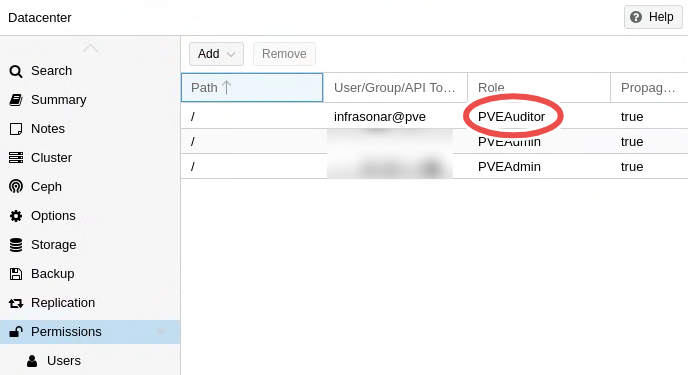
- Click on Permissions in the left-hand navigation pane.
- Click on Add in the top-right corner.
- Fill in the following information:
- User:
infrasonar@pve - Path:
/ - Privileges:
PVEAuditor - Propagte:
true
- User:
- Click on Add in the bottom-right corner.
- Click on API Tokens in the left-hand navigation pane.
- Click on Add in the top-right corner.
- Fill in the following information:
- User:
infrasonar@pve - Token name:
infrasonar - Description:
infrasonar - Privilege Separation:
false
- User:
- Click on Add in the bottom-right corner.
- Copy the Token ID and Secret to a safe place. You will need them to configure the collector in InfraSonar.
Note
Proxmox has a pre-defined role PVEAuditor which allows read-only access to your proxmox cluster.
Deploy
The deployment process for integrating Proxmox with InfraSonar follows a three-step hierarchy:
- Cluster Collector: Start by deploying the cluster collector. This initial step provides an overview of the Proxmox nodes and facilitates their addition as assets in InfraSonar.
- Node Collector: Next, deploy the node collector. This collector offers insights into the individual Proxmox nodes and simplifies the process of adding containers and virtual machines as InfraSonar assets. This is easily done via the Nodes overview within the cluster collector interface.
- Container/VM Collector: Finally, deploy the specific collector for the container and/or virtual machine to gain detailed insights into the guest operating system. This collector can be set up conveniently using the guest view on the cluster collector, which allows you to create a new asset or assign an existing one.
Troubleshooting
You can use the following curl command to test your credentials:
curl -k https://<node-ip>:8006/api2/json/version \
     -H 'Authorization: PVEAPIToken=<userid>@<realm>!<tokenid>=<secret>'
Explanation:
- node-ip: the ip address of your proxmox node
- userid: the user id of your proxmox user
- realm: the realm of your proxmox user
- tokenid: the token id of your proxmox user
- secret: the secret of your proxmox user
Deployment
- Start by adding you Proxmox cluster collector to gain an overview of proxmox nodes and an easy way of adding them to InfraSonar.
- Our Proxmox node collector provides you with a deep insight into your Proxmox node and offers you an easy way to add your Proxmox containers and/or virtual machines as InfraSonar assets.
- Optionally add additional collector for your Proxmox containers and/or virtual machines.
You can automate this step using our InfraSonar Commandline Interfase and Proxmox devices report.